Ir al contenido principal

Como resolver ERROR 1819 (HY000)

Cambiar nivel de politica de MySQL
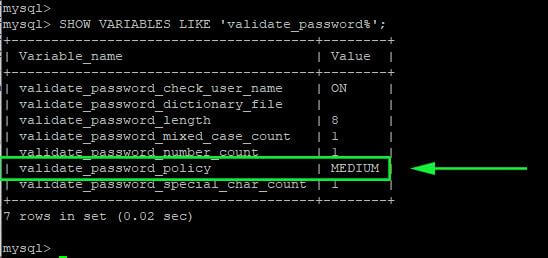


To do so, run the following command from the mysql prompt:


mysql> SET GLOBAL validate_password.policy = 0;

Or,


mysql> SET GLOBAL validate_password.policy=LOW;

Then check if the password validation policy has been changed to low:


mysql> SHOW VARIABLES LIKE 'validate_password%';

Comentarios

Populares🔥

Configuring 20.04 samba for SMBv1

 Configuración de smb V1  Acceder a: sudo nano /etc/samba/smb.conf Pegar debajo de Workgroup            client min protocol = NT1           server min protocol = NT1     3. Reiniciar servicio            sudo service smbd restart           sudo service nmbd restart

Error 0x0000011B

   Fi Restart the Print Spooler Service The print spooler service is responsible for managing all print jobs created on the computer and is often the root of any printer-related bugs. Simply restarting the print spooler service can usually fix the 0x0000011B error.Search for Services in the Start menu and open it. The app lists all services—running or not—on your computer. As the listing is alphabetical, scroll down to find the Print Spooler service. Right-click on the service and select Restart. Windows immediately restarts the service. If the problem was caused by a temporary glitch, this should fix it. Otherwise, try another method. Fix 2: Disable CVE-2021-1678 Mitigation The whole issue has been caused by a recent Windows Update addressing a security vulnerability posed by network printers. If nothing else works, you can perform a registry edit to shut this new feature down. While the edit is simple enough, registry editing always comes with some risk of messing things up...